
微信小程序之八(用户登录)
在商城中,访问个人中心或者购物车前先判断是否登录,从缓存中读取用户名,密码等,若无登录,或者清楚缓存,则需登录。
下面以本人做的登录为例,login.js页面
// pages/login/login.jsPage({ onLoad:function(options){ // 页面初始化 options为页面跳转所带来的参数 var token = wx.getStorageSync('token') var name = wx.getStorageSync('name') var pwd = wx.getStorageSync('pwd') if(token ==''){ wx.navigateTo({ url: '/pages/index/index' }) } if(name!=''){ if(pwd!=''){ wx.redirectTo({ url: '../my/my?name='+name+'&pwd='+pwd+'' }) } } }, //用户名和密码输入框事件 usernameInput:function(e){ // console.log(e) this.setData({ userN:e.detail.value }) }, passwordInput:function(e){ this.setData({ passW:e.detail.value }) }, //登录按钮点击事件,调用参数要用:this.data.参数; //设置参数值,要使用this.setData({})方法 loginBtnClick:function(a){ // console.log(a) var that=this if(this.data.userN.length == 0 || this.data.passW.length == 0){ this.setData({ infoMess:'温馨提示:用户名或密码不能为空!', }) }else{ wx.request({ url: 'http://www.tpshop.com/index.php?m=Api&c=User&a=login', data: { username: this.data.userN, password: this.data.passW, unique_id:'123456' }, header: { 'content-type': 'application/json' }, success: function(res) { // console.log(res.data.result) if(res.data.status == -1){ userName:'缺少参数' }else{ //存用户session // wx.setStorageSync('token', res.data.result.token) // wx.setStorageSync('user_id', res.data.result.user_id) // wx.setStorageSync('name', that.data.userN) // wx.setStorageSync('pwd', that.data.passW) wx.setStorage({ key:'name', data:res.data.result.mobile, }) wx.setStorage({ key:'token', data:res.data.result.token, }) wx.setStorage({ key:'pwd', data:that.data.passW, }) // wx.switchTab({ wx.redirectTo({ url: '../my/my?name='+res.data.result.mobile+'&pwd='+that.data.passW+'' }) } } }) } }})
login.wxml页面
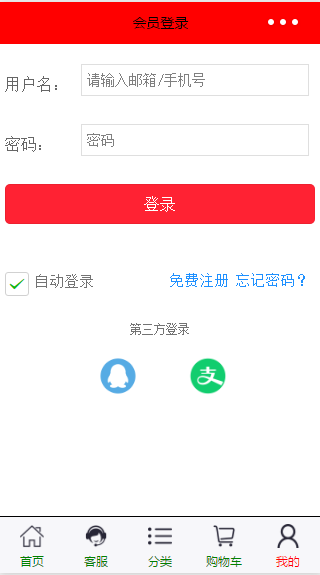
view class="login" view class="section" view class="section__title"用户名:/view input name="username" placeholder="请输入邮箱/手机号" bindinput="usernameInput" / /view view class="section" view class="section__title"密码:/view input password type="text" name="password" placeholder="密码" bindinput="passwordInput" / /view view id='button' button formType="submit" bindtap="loginBtnClick"登录/button /view view id="tishi" {{infoMess}} /view view id="xia" checkbox-group name="checkbox" labelcheckbox value="checkbox1" checked="checked"/自动登录/label /checkbox-group view style="float:left;" navigator url="redirect?title=redirect" open-type="redirect" hover-class="other-navigator-hover"免费注册/navigator navigator url="redirect?title=redirect" open-type="redirect" hover-class="other-navigator-hover"忘记密码?/navigator /view /view view id='di'第三方登录/view view id='san' image src="../../utils/images/QQ.png" / image src="../../utils/images/zhifubao.png" / /view/view
以及手机版样式,login.wxss页面
/* pages/login/login.wxss */.Login{ width:90%; margin:auto; overflow:hidden; padding-top:20px;}#my input{ border: 1px solid black; float: left; margin-left: 5px;}/*page{ margin-top: 20px;}*/.section{ margin-top: 20px; margin-left:5px; display: flex; flex-direction: row; width:95%; overflow:hidden; overflow:hidden;}.section__title{ width:25%; float:left; font-size:16px; line-height:40px; color:#666;}.section input{ border: 1px solid #DFDFDF; height:30px; line-height:30px; width:95%; padding-left: 5px; -webkit-appearance: none; -webkit-box-flex: 1; -webkit-flex: 1; flex: 1; border-radius: 0; -webkit-rtl-ordering: logical; -webkit-user-select: text; cursor: auto; background-color: white; font-size:14px; line-height:30px;}#button button{ display:block; margin:auto; background:#FF2233; font-size:16px; line-height:40px; border:0px; color:#FFF; width:97%; margin:auto;margin-top:20px; margin-bottom:10px;border-radius:5px;}#xia{ margin-top: 30px; margin-left:5px;}#xia checkbox-group{ float: left;color:#737373;font-size:15px;}#xia view{ float: left; margin-left: 72px;}#xia navigator{ float: left; margin: 0 3px; color:dodgerblue;font-size:15px; }#di{ text-align:center;font-size:12px; padding-top:50px; color:#737373;}#san{ margin-left: 23%;}#san image{ width: 40px; height: 40px; margin: 8% 10%;}#tishi{ color:red; text-align:center;font-size:12px; padding-top:8px;}
完成简单的登录页面
声明:本站所有文章资源内容,如无特殊说明或标注,均为采集网络资源。如若本站内容侵犯了原著者的合法权益,可联系本站删除。








