
微信小程序猫眼电影的制作
猫眼电影(微信小程序)的制作
工具
微信开发者工具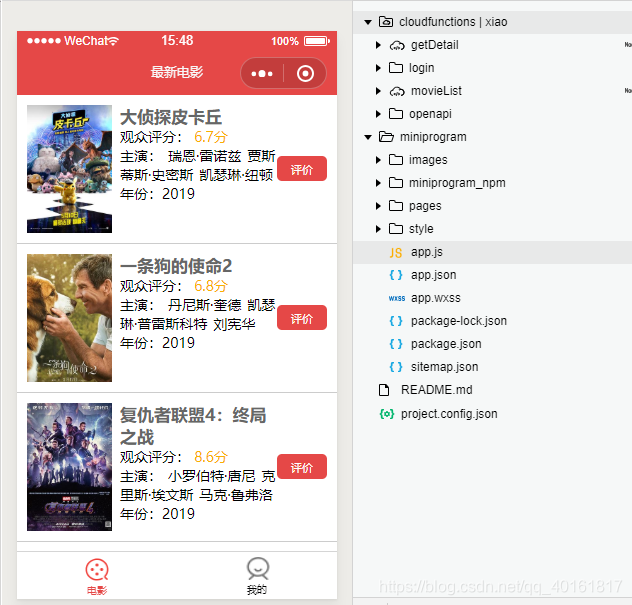
app.json里面是配置文件
cloudfunctions里面是构建的云函数,里面的云函数文件夹每改动一次就要上传并部署
函数的入口文件:
在miniprogram文件夹里面:
// pages/movie/movie.jsPage({ /** * 页面的初始数据 */ data: { movieList:[] }, getMovieList:function(){ wx.showLoading({ title: '加载中', }) wx.cloud.callFunction({ name: 'movieList', data: { start: this.data.movieList.length, count: 10 } }).then(res => { // console.log(res); this.setData({ movieList: this.data.movieList.concat(JSON.parse(res.result).subjects) }); wx.hideLoading(); }).catch(err => { console.error(err); wx.hideLoading(); }) }, gotoComment:function(event){ wx.navigateTo({ url: `../comment/comment?movieid=${event.target.dataset.movieid}`, }) }, /** * 生命周期函数--监听页面加载 */ onLoad: function (options) { this.getMovieList(); }, /** * 生命周期函数--监听页面初次渲染完成 */ onReady: function () { }, /** * 生命周期函数--监听页面显示 */ onShow: function () { }, /** * 生命周期函数--监听页面隐藏 */ onHide: function () { }, /** * 生命周期函数--监听页面卸载 */ onUnload: function () { }, /** * 页面相关事件处理函数--监听用户下拉动作 */ onPullDownRefresh: function () { }, /** * 页面上拉触底事件的处理函数 */ onReachBottom: function () { this.getMovieList(); }, /** * 用户点击右上角分享 */ onShareAppMessage: function () { }})项目源码
https://gitee.com/duladula/cats_eye_movie_program.git
我在这个账号里也有上传
TAG标签: 小程序小程序影视制作许可证
声明:本站所有文章资源内容,如无特殊说明或标注,均为采集网络资源。如若本站内容侵犯了原著者的合法权益,可联系本站删除。








