
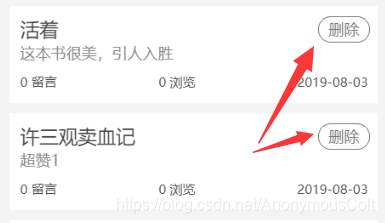
用view实现小程序自定义按钮样式
wxml代码:
<view class="delete" data-index="{{index}}" bindtap="deleteItem">删除</view>wxss代码:
.delete{ width: 70px; height: 45rpx; font-size: 12px; border-width: 1rpx 1rpx 1rpx 1rpx; border-color: #797979; border-style: solid; background-color: #ffffff; color: #797979; border-radius: 98rpx; display: flex; flex-direction: row; align-items: center; justify-content: center;}js代码:
deleteItem: function (e) { var that = this; wx.showModal({ title: '提示', content: '确定要删除吗?', success: function (sm) { if (sm.confirm) { // 用户点击了确定 可以调用删除方法了 console.log('用户点击确定') let id = that.data.bookReviewList[e.currentTarget.dataset.index].book_id console.log(id) that.data.bookReviewList.splice(e.currentTarget.dataset.index, 1) that.setData({ bookReviewList: that.data.bookReviewList, scrollLeft: 0, }) wx.request({ url: '这里写地址', data: { }, header: { 'content-type': 'application/x-www-form-urlencoded', 'Accept': 'application/json' }, method: 'DELETE', success: function (res) { console.log(res.data) } }) } else if (sm.cancel) { console.log('用户点击取消') } } }) },实现效果:
声明:本站所有文章资源内容,如无特殊说明或标注,均为采集网络资源。如若本站内容侵犯了原著者的合法权益,可联系本站删除。








