
微信小程序家庭记账本开发(五)

今天重点学习了框架的视图层,里面包含了小程序编写的最基本语法,我觉得是非常基础而且重要的

逻辑层注册页面中了解到,data 是页面第一次渲染使用的初始数据。页面加载时,data 将会以JSON字符串的形式由逻辑层传至渲染层,因此data中的数据必须是可以转成JSON的类型:字符串,数字,布尔值,对象,数组。我觉得这一点很重要
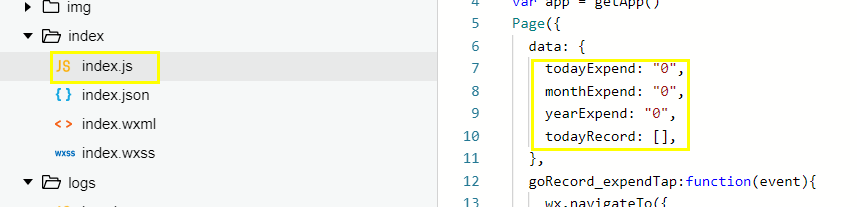
因为是跟着视频学习,所以学习的内容并不是很全面,而且在学习时,因为时间比较紧张,就重点对照记账本所需要的功能来补充自己。而且我发现,小程序更侧重于前端的开发。
今天学到的新知识:表单的生成,因为要制作“历史消费”这个界面,所以跟着视频重点攻克了“history-bill”这个文件夹;
最后效果:

1 !--pages/history-bill/history-bill.wxml-- 2 view class="ui-height-100" 3 !--顶部查询时间选择-- 4 view class="date-select" 5 view class="ui-flex-1"开始时间:/view 6 picker class="ui-flex-1" mode="date" value="{{startdDate}}" start="2019-02-15" end="endDate" bindchange="bindDateChange" 7 view class="picker-date" 8 {{startdDate}} 9 /view10 /picker11 view class="ui-flex-1"结束时间:/view12 picker class="ui-flex-1" mode="date" value="{{startdDate}}" start="startdDate" end="today" bindchange="bindDateChange"13 view class="picker-date"14 {{endDate}}15 /view16 /picker17 /view18 view class="line"/view19 !--上方文字标题--20 view class="history-bill-table-title"21 view class="ui-flex-1"日期/view22 view class="ui-flex-1"花费金额/view23 view class="ui-flex-1"主要用途/view24 /view25 view class="line"/view26 !--账单列表--27 scroll-view scroll-y="true" class="ui-height-100" bindscrolltoupper="upper" bindscrolltolower="lower"28 block wx:for="{{historyBillList}}"29 view class="history-bill-list "30 view class="ui-flex-1"{{item.date}}/view31 view class="ui-flex-1"{{item.money}}/view32 view class="ui-flex-1"{{item.user}}/view33 /view34 /block35 /scroll-view36 /view 1 /**index.wxss**/ 2 .userinfo { 3 display: flex; 4 flex-direction: initial; 5 align-items: left; 6 background: green; 7 width: 100%; 8 } 9 10 .userinfo-avatar {11 width: 128rpx;12 height: 128rpx;13 margin: 20rpx;14 border-radius: 50%;15 }16 17 .userinfo-nickname {18 color: #aaa;19 }20 21 .usermotto {22 margin-top: 200px;23 }
声明:本站所有文章资源内容,如无特殊说明或标注,均为采集网络资源。如若本站内容侵犯了原著者的合法权益,可联系本站删除。








