
微信小程序开发笔记(一)设置透明按钮
**
微信小程序开发笔记(1)–设置透明按钮 `
一个菜鸟的学习笔记 如有错误轻点喷 谢谢
在学习微信小程序时 遇到想做一个完全透明的按钮
view style="width:120rpx;" button class="okbtn" bindtap='oknum'确认提交/button /view`一开始在微信公众平台的组件里发现 属性里有 plain可以使按钮透明
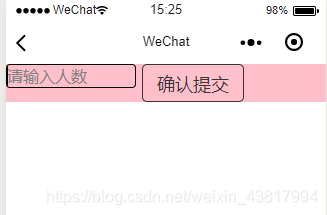
使用后发现背景会透明但是有边框
即使在wxss里设置border也去除不了
.okbtn{ width:240rpx; height:90rpx; text-align: center; line-height: 38px; border:none; } .okbtn::after{ border:none; }如图
最后在百度搜索找到方法:将中的plain属性去除
然后设置wxss 的background-color: transparent;
代码:
效果:透明无边框: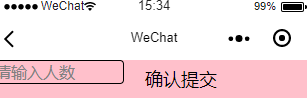
**
TAG标签: 微信小程序
声明:本站所有文章资源内容,如无特殊说明或标注,均为采集网络资源。如若本站内容侵犯了原著者的合法权益,可联系本站删除。








