
微信小程序之授权登录的实现(button按钮)
前言:由于微信官方修改了 getUserInfo、authorize 接口,无法弹出授权窗口,所以现在无法实现一进入微信小程序就弹出授权窗口,只能通过 button 去触发
1.实现思路微信授权登录仅适用于使用微信用户信息的用户,如果自己的项目有完善的用户信息(一套式开发项目),可不使用微信用户信息;如果仅为微信小程序,则要授权、获取用户信息
自己写一个微信授权登录页面让用户实现点击的功能,也就是实现了通过 button 组件去触发 getUserInof 接口。在用户进入微 信小程序的时候,判断用户是否授权了,如果没有授权的话就显示下面“界面简介”的第一个图,让用户去执行授权的操作。如 果已经授权了,则直接跳过这个页面,进入首页。
2.界面简介
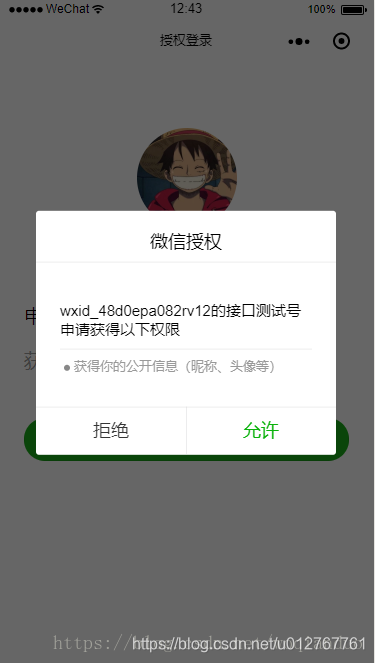 3.源码authorize.html
view wx:if="{{canIUse}}" view class='header' image src='/images/wx_login.png'/image /view
view class='content' view申请获取以下权限/view text获得你的公开信息(昵称,头像等)/text /view
button class='bottom' type='primary' open-type="getUserInfo" lang="zh_CN" bindgetuserinfo="bindGetUserInfo" 授权登录 /button/view
view wx:else请升级微信版本/view
authorize.wxss
.header { margin: 90rpx 0 90rpx 50rpx; text-align: center; width: 650rpx; height: 300rpx; line-height: 450rpx;}
.header image { width: 200rpx; height: 200rpx;}
.content { margin-left: 50rpx; margin-bottom: 90rpx;}
.content text { display: block; color: #9d9d9d; margin-top: 40rpx;}
.bottom { border-radius: 80rpx; margin: 70rpx 50rpx; font-size: 35rpx;}
authorize.json
{ "navigationBarTitleText": "授权登录"}authorize.js
const app = getApp();Page({ data: { //判断小程序的API,回调,参数,组件等是否在当前版本可用。 canIUse: wx.canIUse('button.open-type.getUserInfo') }, onLoad: function () { var that = this; // 查看是否授权 wx.getSetting({ success: function (res) { if (res.authSetting['scope.userInfo']) { wx.getUserInfo({ success: function (res) { //从数据库获取用户信息 that.queryUsreInfo(); //用户已经授权过 wx.switchTab({ url: '/pages/index/index' }) } }); } } }) }, bindGetUserInfo: function (e) { if (e.detail.userInfo) { //用户按了允许授权按钮 var that = this; //插入登录的用户的相关信息到数据库 wx.request({ url: app.globalData.urlPath + 'user/add', data: { openid: getApp().globalData.openid, nickName: e.detail.userInfo.nickName, avatarUrl: e.detail.userInfo.avatarUrl, province:e.detail.userInfo.province, city: e.detail.userInfo.city }, header: { 'content-type': 'application/json' }, success: function (res) { //从数据库获取用户信息 that.queryUsreInfo(); console.log("插入小程序登录用户信息成功!"); } }); //授权成功后,跳转进入小程序首页 wx.switchTab({ url: '/pages/index/index' }) } else { //用户按了拒绝按钮 wx.showModal({ title:'警告', content:'您点击了拒绝授权,将无法进入小程序,请授权之后再进入!!!', showCancel:false, confirmText:'返回授权', success:function(res){ if (res.confirm) { console.log('用户点击了“返回授权”') } } }) } }, //获取用户信息接口 queryUsreInfo: function () { wx.request({ url: app.globalData.urlPath + 'user/userInfo', data: { openid: app.globalData.openid }, header: { 'content-type': 'application/json' }, success: function (res) { console.log(res.data); getApp().globalData.userInfo = res.data; } }); },
})代码的 wx.request 是小程序发起网络请求,用于用户与数据的交互。官网地址:https://developers.weixin.qq.com/miniprogram/dev/api/network-request.html URL分析:app.globalData.urlPath(全局url;例如:https://www.baidu.com) user/userInfo(接口具体地址)
小程序源码地址:https://github.com/cuigeg/wxchat.git
拓展安利一下,微信小程序什么情况下需要授权:

授权代码:
注意:wx.authorize({scope: “scope.userInfo”}),无法弹出授权窗口,请使用 button open-type="getUserInfo"/button
wx.getSetting({ success(res) { if (!res.authSetting['scope.record']) { wx.authorize({ scope: 'scope.record', success() { // 用户已经同意小程序使用录音功能,后续调用 wx.startRecord 接口不会弹窗询问 wx.startRecord() } }) } }})参考文章地址:https://blog.csdn.net/weidong_y/article/details/79636386
声明:本站所有文章资源内容,如无特殊说明或标注,均为采集网络资源。如若本站内容侵犯了原著者的合法权益,可联系本站删除。








