
小程序微信支付功能开发
关于小程序内唤起微信支付功能,不同人有不同的思路,有嵌套H5页面的,也有跳转第三方链接网站的,也有放收钱码等图片的。
今天讲一下微信原生的微信支付功能基础版块,支付页面和支付逻辑。
先上个效果图: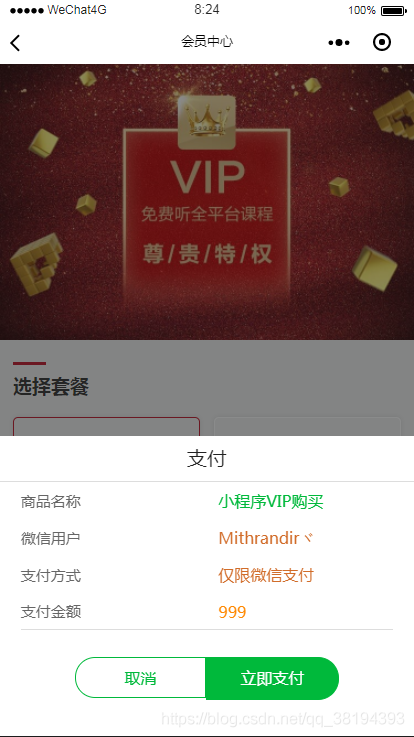
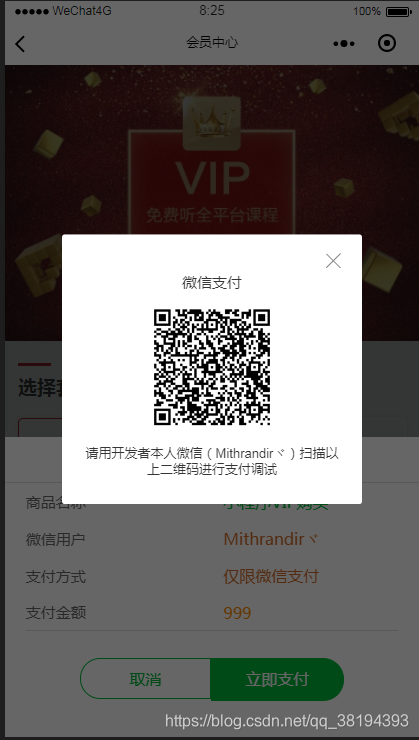
页面展示上提供了,商品名称,支付方式,用户信息,支付金额。更详细的可以包含手机号,订单号等信息。而在微信支付文档中所必须提供的内容就是商品价格{{total_fee}},还有商品描述{{body}},以及我们要录入的用户信息{{unioid}}或者{{openid}}。如何获取openid和unioid我会在另一篇中讲到。
这是前端提供给后端的数据,那么后端需要布置什么内容呢?
就是基础项:
这些基础内容除了openid和total_fee是获取前端,其他的信息就是小程序账号的设置信息,以及微信开放平台的商户信息。商户信息需要始终正确。
有了这些信息,我们可以通过前端JS来执行接口调试。
在执行过程中唤起支付弹窗,调试接口信息是否有错误;下面是提交的信息,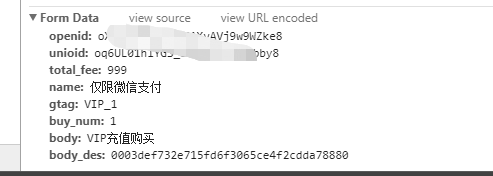
下面是返回的信息: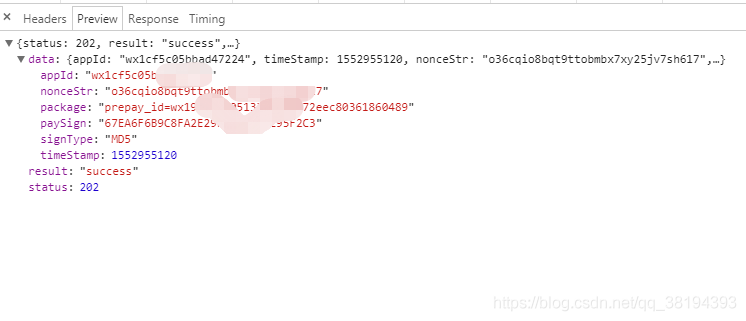
至此完整的原生支付功能就实现了。
支付接口信息有微信官方提供的支付文档下载包,我用的是php版本的。
附上支付页面的代码和样式代码:
WXSS代码;
.payWay-container { position: fixed; width: 100%; height: 100%; left: 0; right: 0; bottom: 0; z-index: 99999; background-color: rgba(22, 23, 24, 0.5);}.prompt { position: fixed; width: 100%; height: 100%; top: 0; left: 0; right: 0; bottom: 0; background-color: rgba(22, 23, 24, 0.5); z-index: 102;}.pay-container { position: absolute; width: 100%; left: 0; bottom: 0; background: #fff; z-index: 9999;}.error { position: absolute; width: 100%; height: 100%; left: 0; top: 0; background: #fff; z-index: 999;}.pay-title { position: relative; height: 83.3333rpx; border-bottom: 1rpx solid #ddd; color: #222; font-size: 37.5rpx; line-height: 83.3333rpx; text-align: center;}.pay-img image { width: 240rpx; height: 240rpx; display: flex; justify-content: center; margin: 0 auto;}.pay-content { display: flex; flex-direction: row; align-items: center; justify-content: space-between; margin: 0 auto; width: 90%; min-height: 68rpx; color: #666; font-size: 30rpx;}.getphone { border-radius: 80rpx; margin: 70rpx 50rpx; font-size: 30rpx; width: 100%;}.pay-content.honey-content { border-bottom: 1rpx solid #ddd;}.pay-content.honey-content .pay-content-right { color: #999;}.pay-content.honey-content .pay-content-right { color: #f80;}.pay-content-left { display: flex; align-items: center;}.honey-logo { width: 43rpx; height: 43rpx; margin-right: 16rpx;}.pay-content:last-child { border-bottom: 1rpx solid #ddd;}.pay-content .pay-content-right { color: #222; font-size: 29.167rpx;}.pay-content .pay-content-right.price { color: #f80;}.pay-content .detail { color: #00b93b;}.pay-content .name { color: #d16c29;}.pay-content .phone { color: #2694dd;}.pay-content .coupon-detail { color: #999;}.pay-content .coupon-detail.detail { color: #00b93b;}.pay-content .explain-left { width: 20%;}.pay-content .explain { color: #f80; font-size: 20rpx;}.pay-content .pay-image { margin-left: 5.556rpx; width: 11.1111rpx; height: 21.52778rpx;}.pay-content .coupon-left { display: flex; align-items: center;}.pay-content .coupon-left .use-len { margin-left: 10rpx; padding: 6rpx 8rpx; border: 1rpx solid #fd3735; color: #f74d62; font-size: 16rpx;}.pay-content .coupon-left .use-len.match-best { color: #fff; background-color: #fd3735;}.pay-list { margin: 0 auto; width: 90%; border-top: 1rpx solid #c2c2c2;}.pay-list-li, .pay-list-text { display: flex; justify-content: space-between; align-items: center;}.pay-list-li { height: 108.33rpx; border-bottom: 1rpx solid #c2c2c2; color: #333; font-size: 31.25rpx;}.pay-list .pay-list-img { margin-right: 20.833rpx; width: 66.6667rpx; height: 66.6667rpx;}.pay-list .pay-list-detail { margin-left: 20.833rpx; color: #999; font-size: 25rpx;}.select-pay { position: relative; width: 41.667rpx; height: 41.667rpx; border: 1rpx solid #d8d8d8; border-radius: 50%;}.select-pay.active { background: #00b93b;}.select-pay .select-check { position: absolute; width: 26.38889rpx; height: 17.361rpx; top: 14.111rpx; left: 7.3rpx;}.pay-btn { display: flex; margin: 50rpx auto 70rpx; flex-direction: row; justify-content: center; width: 480rpx; height: 75rpx;}.pay-btn .btns { display: flex; align-items: center; justify-content: center; margin: 0; padding: 0; width: 240rpx; height: 75rpx; background: #fff; border: 1rpx solid #00b93b; border-radius: 0; border-top-left-radius: 42rpx; border-bottom-left-radius: 42rpx; color: #00b93b; font-size: 29.166rpx;}.pay-btn .submit { background: #00b93b; box-sizing: content-box; border-radius: 0; border-top-right-radius: 42rpx; border-bottom-right-radius: 42rpx; color: #fff;}.order-fail { padding-top: 60rpx; color: #222; font-size: 37.5rpx; text-align: center;}.order-fail .coupon-submit { border-color: #00b93b; color: #00b93b;}button::after { border: none;}.coupon-submit { display: flex; justify-content: center; align-items: center; margin: 50rpx auto; width: 416.667rpx; height: 75rpx; border: 1rpx solid #d8d8d8; border-radius: 45rpx; color: #c2c2c2; font-size: 31.25rpx;}.isPayShow { display: block;}.isPayHide { display: none;}以上这个属于template模板,供其页面来动态调用的;
<view class="shadow-box {{isPayTrue?'isPayShow':'isPayHide'}}"> <include src="../../template/helppay/helppay"></include></view>后续会继续补充小程序支付功能的开发。
声明:本站所有文章资源内容,如无特殊说明或标注,均为采集网络资源。如若本站内容侵犯了原著者的合法权益,可联系本站删除。








