
微信小程序之上传图片到云端存储并返回图片地址
让用户选择照片并上传到小程序云端存储空间的代码
1、原理
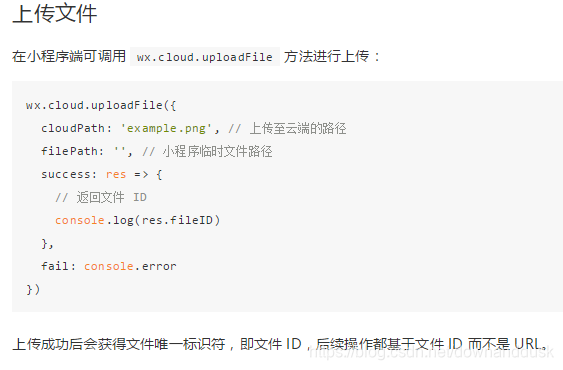
1)wx.cloud.uploadFile()
2)wx.chooseImage()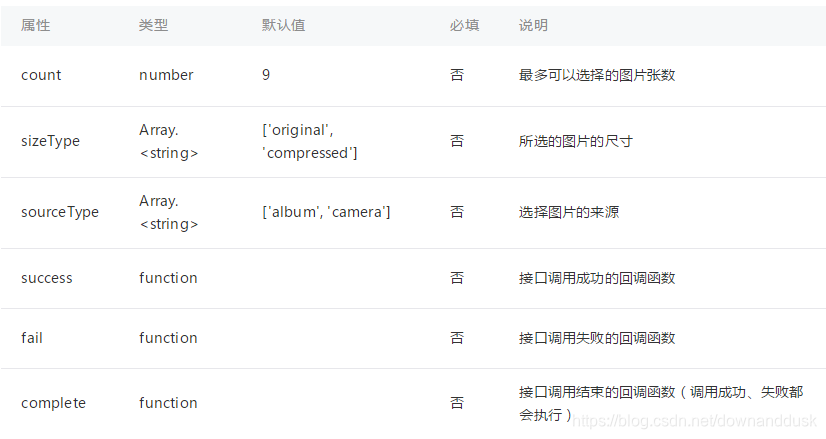
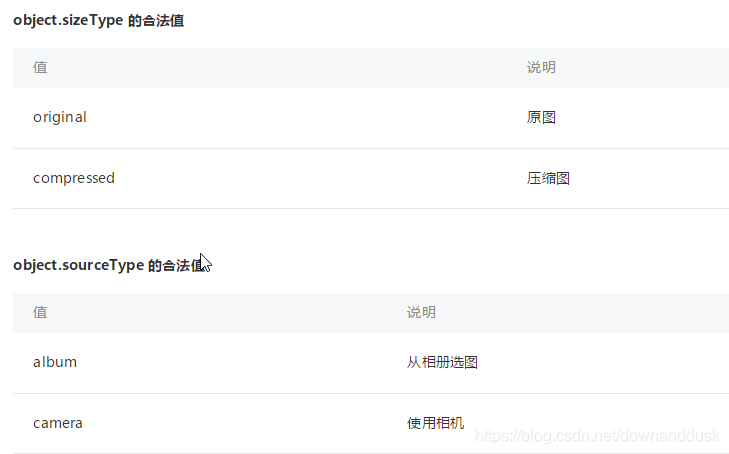
2、整合代码
//JS文件 上传图片函数upload_picture: function(name) { var that = this //让用户选择或拍摄一张照片 wx.chooseImage({ count: 1, sizeType: ['original', 'compressed'], sourceType: ['album', 'camera'], success(res) { //选择完成会先返回一个临时地址保存备用 const tempFilePaths = res.tempFilePaths //将照片上传至云端需要刚才存储的临时地址 wx.cloud.uploadFile({ cloudPath: 'test.jpg', filePath: tempFilePaths[0], success(res) { //上传成功后会返回永久地址 console.log(res.fileID) } }) } }) }3、实例体验

声明:本站所有文章资源内容,如无特殊说明或标注,均为采集网络资源。如若本站内容侵犯了原著者的合法权益,可联系本站删除。








