
小程序(wepy框架)页面优化之骨架镜使用
最近一直在玩 B 站, 然后发现B站里面有骨架镜的功能,因为之前在写小程序的时候也想用,但是无奈项目紧迫没时间研究,然后今天花了一天的时间,下面说说如何应用。
理想是 写一个组件,然后各个页面只要引入该组件就有相关功能,OK 下面封装一个
首先介绍官方为我们提供的 API 之 wx.createSelectorQuery() 然后地下给了我们几个用法 我们一一介绍一下
wx.createSelectorQuery().selectAll(`.${class名字/id名字}`)他返回的是我们所选中的dom数组
wx.createSelectorQuery().selectAll(`.${class名字/id名字}`).boundingClientRect()看API能看出来 boundingClientReact 是返回相关dom的属性 例如 宽、高等。之后执行 .exec(),boundingClientRect() 返回的信息会在 callback中返回
wx.createSelectorQuery().selectAll(`.${class名字/id名字}`).boundingClientRect().exec()**
skeleton.wpy
**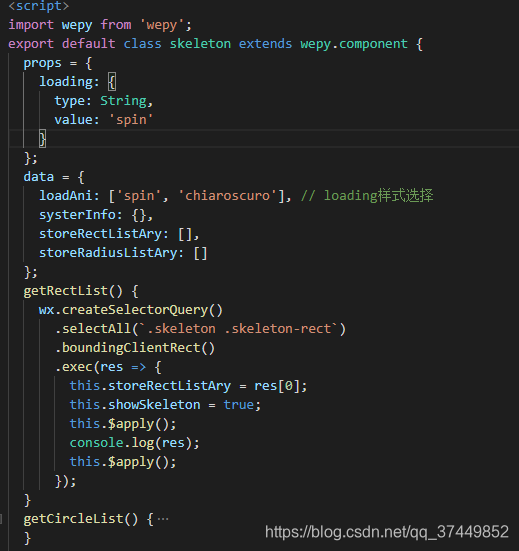
我们使用两个方法 geRecList() 和 getCircleList() 分别获取 父级(引用该组件的页面)所有 相关(注释 A)的dom元素,然后对他们进行使用
例如 循环遍历 storeRectListAry 这个数组的时候 他们每个 item 就是每个dom元素的属性集合 所以我们可以在后面使用 item.width 来根据该dom的宽高进行绘制
两个循环是因为我们考虑到 矩形 和 圆形
然后在组件onload(){}中使用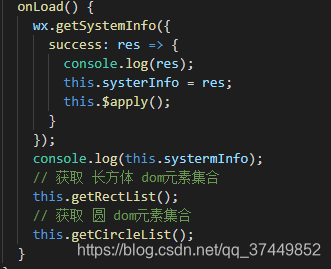
开始获取父级中的元素
在 父级 index.wpy 中引入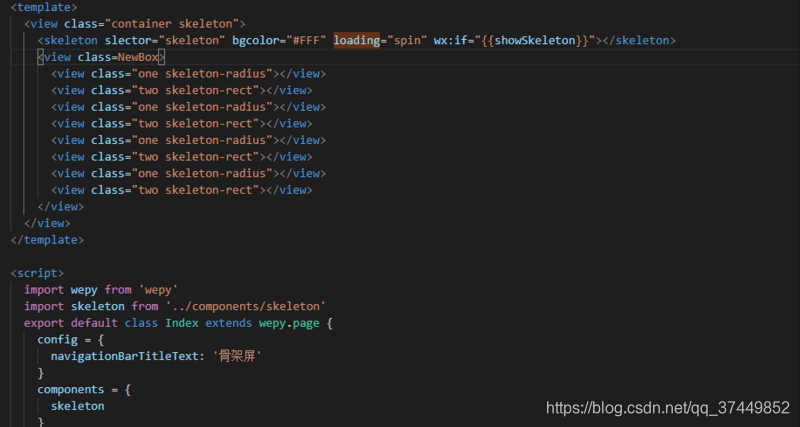
showSkeleton 是要做一个延时的效果 你可以写
记得在 data = { showSkeleton : false }
电脑在公司了 明天穿到github上 地址明天会给 希望对你有所帮助 记得给个star哦
地址
声明:本站所有文章资源内容,如无特殊说明或标注,均为采集网络资源。如若本站内容侵犯了原著者的合法权益,可联系本站删除。








