
wx小程序表单提交
文章参考
事件说明
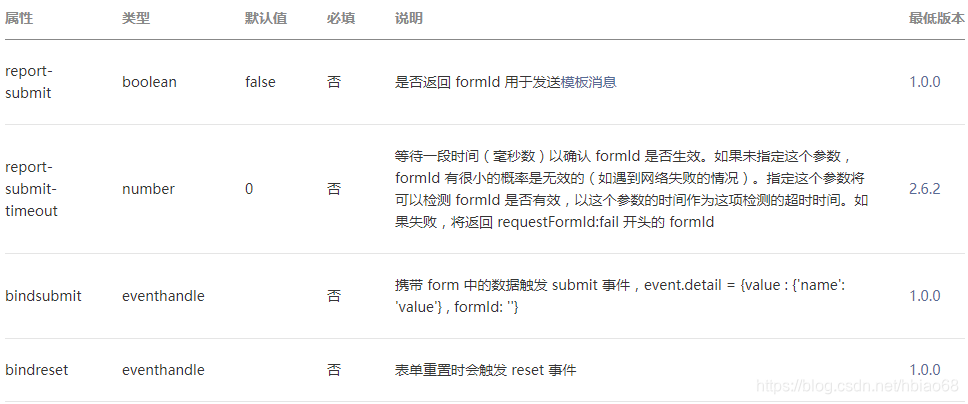
案例说明
!-- view class="" style="height:100%;" --view class="" style="" form bindsubmit="formSubmit" bindreset="formReset" report-submit="true" view class="section section_gap" view class="section__title"是否公开信息/view switch name="isPub" / /view view class="section" view class="section__title"手机号/view input name="phone" placeholder="手机号" / /view view class="section" view class="section__title"密码/view input name="pwd" placeholder="密码" password/ /view view class="section section_gap" view class="section__title"性别/view radio-group name="sex" label radio value="男" checked/男/label label radio value="女" /女/label /radio-group /view view class="section section_gap" view class="section__title"checkbox/view checkbox-group name="hobbies" label checkbox value="basketball" /篮球/label label checkbox value="football" /足球/label /checkbox-group /view view class="btn-area" button formType="submit"提交/button button formType="reset"重置/button /view /form view wx:if="{{isSubmit}}" {{warn ? warn : "是否公开信息:"+isPub+",手机号:"+phone+",密码:"+pwd+",性别:"+sex+ "爱好:" + hobbies }} /view/viewreport-submit=“true” 或者 report-submit="{{true}}" 表示返回 formId 用于发送模板消息
Page({ /** * 页面的初始数据 */ data: { isSubmit: false, warn: "", phone: "", pwd: "", isPub: false, sex: "男", hobbies: [] }, backTopAction: function () { wx.pageScrollTo({ scrollTop: 0, }) }, formSubmit: function(e) { console.log('form发生了submit事件,携带数据为:', e.detail.value); debugger // 定义变量,从e.detail.value 中获取值,ES6的语法,在react中常用 let {phone, pwd, isPub, sex, hobbies} = e.detail.value; if (!phone || !pwd) { this.setData({ warn: "手机号或密码为空!", isSubmit: true }) return; } this.setData({ warn: "", isSubmit: true, phone, pwd, isPub, sex, hobbies }) }, formReset: function() { console.log('form发生了reset事件'); this.setData({ isSubmit: false }) }, /** * 页面相关事件处理函数--监听用户下拉动作 */ onPullDownRefresh: function() { console.log("onPullDownRefresh");//停止当前页面下拉刷新。 wx.stopPullDownRefresh() }, /** * 页面上拉触底事件的处理函数 */ onReachBottom: function() { console.log("onReachBottom") }, /** * 用户点击右上角分享 */ onShareAppMessage: function() { console.log("onShareAppMessage") }, // 滚动条滑动触发的事件 onPageScroll: function (resObj) { // console.log("onPageScroll") // console.log(resObj.scrollTop); },})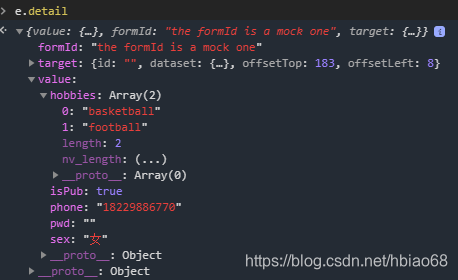
声明:本站所有文章资源内容,如无特殊说明或标注,均为采集网络资源。如若本站内容侵犯了原著者的合法权益,可联系本站删除。








