
微信小程序商城开发之实现用户收货地址管理页面的代码
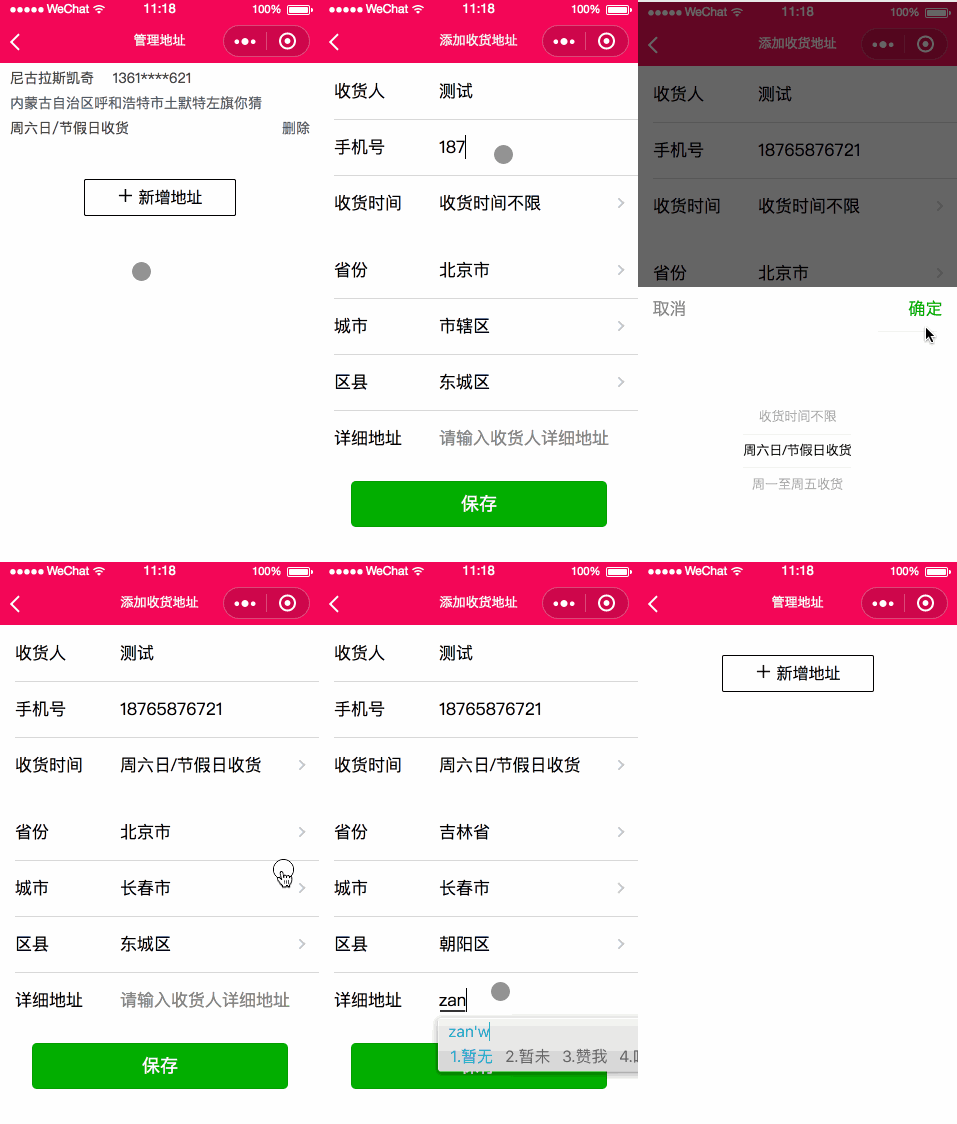
1、布局收货地址列表和新增收货地址页面
2、实现省市县三级联动功能
3、使用缓存管理数据
一、收货地址列表管理
addressList.wxml
<scroll-view class="scroll" scroll-y="true"> <view wx:for="{{addressList}}"><view class="product-name-wrap"> <view class="ui-list-item-info">{{item.consignee}} <text decode="{{true}}" space="{{true}}"> </text> {{item.mobile}} </view> <view class="ui-list-item-address"> {{item.address}} </view> <view class="ui-list-item-time"> <p>{{item.transportDay}}</p> <p class="ui-list-item-del" data-id="{{index}}" bindtap="delAddress">删除</p> </view> <view class="separate"></view></view></view></scroll-view><view class="add-address" bindtap="addAddress"><image class="add-img" src="../../images/add.png"></image>新增地址</view>addressList.wxss
page{ display: flex; flex-direction: column; height: 100%; } .product-name-wrap{ margin: 0px 10px; font-size: 14px; color: #404040;}.ui-list-item-info{ margin: 5px 0px;}.ui-list-item-address{ color: #585c64;}.ui-list-item-time{ margin: 5px 0px;}.ui-list-item-del{ position: absolute; right: 10px; color: #585c64;}/* 分割线 */.separate { margin: 5px 0px; height: 2rpx; background-color: #f2f2f2;}.add-address{ margin: 0 auto; margin-top: 30px; width: 150px; height: 35px; border: 1px #000 solid; line-height: 35px; text-align: center; color: #000; border-radius: 5rpx; display: block;}.add-img{ margin-right: 15rpx; width: 15px; height: 15px;}addressList.json
{ "navigationBarTitleText": "管理地址"}addressList.js
Page({ /**页面的初始数据 */ data: { addressList:[] }, /*生命周期函数--监听页面加载*/ onLoad: function (options) { var arr = wx.getStorageSync('addressList') || []; console.info("缓存数据:" + arr); // 更新数据 this.setData({ addressList: arr }); }, /**生命周期函数--监听页面显示 */ onShow: function () { this.onLoad(); }, addAddress:function(){ wx.navigateTo({ url: '../address/address' }); }, /* 删除item */ delAddress: function (e) {this.data.addressList.splice(e.target.id.substring(3), 1);// 更新data数据对象 if (this.data.addressList.length > 0) { this.setData({ addressList: this.data.addressList }) wx.setStorageSync('addressList', this.data.addressList);} else { this.setData({ addressList: this.data.addressList }) wx.setStorageSync('addressList', []);} }})二、新增收货信息
address.wxml
address.wxss
@import '../../utils/weui.wxss';.weui-cells:before{ top:0; border-top:1rpx solid white; }.weui-cell{ line-height: 3.5rem;}.weui-cells:after{ bottom:0;border-bottom:1rpx solid white}.weui-btn{ width: 80%;}address.json
{ "navigationBarTitleText": "添加收货地址"}address.js
var area = require(’…/…/utils/area.js’);
var areaInfo = []; //所有省市区县数据
var provinces = []; //省
var provinceNames = []; //省名称
var citys = []; //城市
var cityNames = []; //城市名称
var countys = []; //区县
var countyNames = []; //区县名称
var value = [0, 0, 0]; //数据位置下标
var addressList = null;
Page({
/**
- 页面的初始数据
*/
data: {
transportValues: ["收货时间不限", "周六日/节假日收货", "周一至周五收货"],transportIndex: 0,provinceIndex: 0, //省份cityIndex: 0, //城市countyIndex: 0, //区县},
/**
- 生命周期函数–监听页面加载
*/
onLoad: function(options) {
},
/**
- 生命周期函数–监听页面显示
*/
onShow: function() {
var that = this;area.getAreaInfo(function(arr) { areaInfo = arr; //获取省份数据 that.getProvinceData();});},
// 获取省份数据
getProvinceData: function() {
var that = this;var s;provinces = [];provinceNames = [];var num = 0;for (var i = 0; i < areaInfo.length; i++) { s = areaInfo[i]; if (s.di == "00" && s.xian == "00") { provinces[num] = s; provinceNames[num] = s.name; num++; }}that.setData({ provinceNames: provinceNames})that.getCityArr();that.getCountyInfo();},
// 获取城市数据
getCityArr: function(count = 0) {
var c;citys = [];cityNames = [];var num = 0;for (var i = 0; i < areaInfo.length; i++) { c = areaInfo[i]; if (c.xian == "00" && c.sheng == provinces[count].sheng && c.di != "00") { citys[num] = c; cityNames[num] = c.name; num++; }}if (citys.length == 0) { citys[0] = { name: '' }; cityNames[0] = { name: '' };}var that = this;that.setData({ citys: citys, cityNames: cityNames})console.log('cityNames:' + cityNames);that.getCountyInfo(count, 0);},
// 获取区县数据
getCountyInfo: function(column0 = 0, column1 = 0) {
var c;countys = [];countyNames = [];var num = 0;for (var i = 0; i < areaInfo.length; i++) { c = areaInfo[i]; if (c.xian != "00" && c.sheng == provinces[column0].sheng && c.di == citys[column1].di) { countys[num] = c; countyNames[num] = c.name; num++; }}if (countys.length == 0) { countys[0] = { name: '' }; countyNames[0] = { name: '' };}console.log('countyNames:' + countyNames);var that = this;// value = [column0, column1, 0];that.setData({ countys: countys, countyNames: countyNames, // value: value,})},
bindTransportDayChange: function(e) {
console.log('picker country 发生选择改变,携带值为', e.detail.value);this.setData({ transportIndex: e.detail.value})},
bindProvinceNameChange: function(e) {
var that = this;console.log('picker province 发生选择改变,携带值为', e.detail.value);var val = e.detail.valuethat.getCityArr(val); //获取地级市数据that.getCountyInfo(val, 0); //获取区县数据value = [val, 0, 0];this.setData({ provinceIndex: e.detail.value, cityIndex: 0, countyIndex: 0, value: value})},
bindCityNameChange: function(e) {
var that = this;console.log('picker city 发生选择改变,携带值为', e.detail.value);var val = e.detail.valuethat.getCountyInfo(value[0], val); //获取区县数据value = [value[0], val, 0];this.setData({ cityIndex: e.detail.value, countyIndex: 0, value: value})},
bindCountyNameChange: function(e) {
var that = this;console.log('picker county 发生选择改变,携带值为', e.detail.value);this.setData({ countyIndex: e.detail.value})},
saveAddress: function(e) {
var consignee = e.detail.value.consignee;var mobile = e.detail.value.mobile;var transportDay = e.detail.value.transportDay;var provinceName = e.detail.value.provinceName;var cityName = e.detail.value.cityName;var countyName = e.detail.value.countyName;var address = e.detail.value.address;console.log(transportDay + "," + provinceName + "," + cityName + "," + countyName + "," + address); //输出该文本 var arr = wx.getStorageSync('addressList') || [];console.log("arr,{}", arr);addressList = { consignee: consignee, mobile: mobile, address: provinceName + cityName + countyName+address, transportDay: transportDay} arr.push(addressList);wx.setStorageSync('addressList', arr);wx.navigateBack({ }) }})area.js和weui.wxss 可以看下方源码获取方式,这里就不多做解释。
微信小程序声明:本站所有文章资源内容,如无特殊说明或标注,均为采集网络资源。如若本站内容侵犯了原著者的合法权益,可联系本站删除。








