微信小程序开发常用技巧(8)——给你的小程序添加一个客服会话
今天我们给小程序添加一个简单的客服功能。客服人员可以直接使用微信公众平台网页版客服工具进行客服消息回复。
首先来看看页面长什么样: 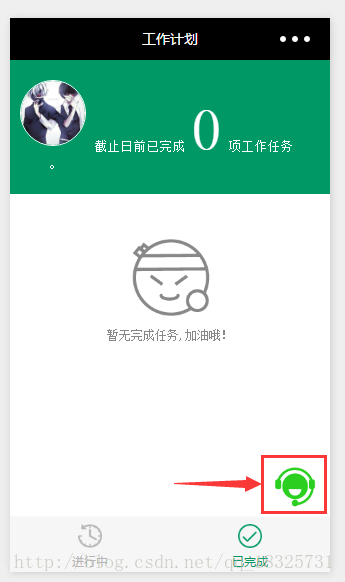
应该已经看到了底部的客服图标按钮。接下来看看代码,代码也很简单。
是不是很简单。接下需要做的是在后台配置客服人员微信,然后通过网页版客服工具就可以进行测试了。快去试试吧!
声明:本站所有文章资源内容,如无特殊说明或标注,均为采集网络资源。如若本站内容侵犯了原著者的合法权益,可联系本站删除。

今天我们给小程序添加一个简单的客服功能。客服人员可以直接使用微信公众平台网页版客服工具进行客服消息回复。
首先来看看页面长什么样:
应该已经看到了底部的客服图标按钮。接下来看看代码,代码也很简单。
是不是很简单。接下需要做的是在后台配置客服人员微信,然后通过网页版客服工具就可以进行测试了。快去试试吧!
声明:本站所有文章资源内容,如无特殊说明或标注,均为采集网络资源。如若本站内容侵犯了原著者的合法权益,可联系本站删除。








