
微信小程序开发问题解决,常见BUG总结
小程序开发中的各种坑,进行简要总结,欢迎填坑`
优化代码包
尽量减少代码包的大小,因为代码包大小直接影响到下载速度,从而影响用户的首次打开体验。2M限制。小程序代码包经过编译后,会放在微信的 CDN 上供用户下载,CDN 开启了 GZIP 压缩,多数图片格式大大降低代码包压缩率。使用云服务器存储图片,使用字体图标
调起微信开发者工具 wechatide://minicode/eJwL4bmd6mY3
1.小程序字体
换行符也可写在js参数data,注意 n 空格转义字符 必须在标签内转义字符解码属性decode设置true,decode可以解析的有 < > & '
2.提交表单
用form来获取参数,元素标签需要加属性name=“my-name”才可以获取到
<form bindsubmit="formSubmit">formSubmit: function (e) { console.log('form发生了submit事件,携带数据为:', e.detail.value)}3.去掉按钮边框线 button:after {border-width: 0;}
4.路径页面传参,新页面onLoad页面加载options接收参数
<navigator url="/navigator/navigator?title=1&&idx=one"></navigator>index.js
Page({ data:{ }, onLoad:function(options){ // 生命周期函数--监听页面加载 this.setData({ title: options.title, idx : options.idx }) }})5.选择框自定义样式
radio .wx-radio-input{ width: 60rpx; height: 60rpx; border-radius: 4rpx;}radio .wx-radio-input-checked { background: #fff;}radio .wx-radio-input.wx-radio-input-checked::before{ width: 60rpx; height: 60rpx; line-height: 60rpx; text-align: center; color: #fff; border: 1rpx solid #efa100; border-radius: 4rpx; background-color: #efa100; transform: translate(-50%, -50%) scale(1);}checkbox .wx-checkbox-input{ width: 60rpx; height: 60rpx; border-radius: 4rpx;}checkbox .wx-checkbox-input-checked { background: #fff;}checkbox .wx-checkbox-input.wx-checkbox-input-checked::before{ width: 60rpx; height: 60rpx; line-height: 60rpx; text-align: center; color: #fff; border: 1rpx solid #efa100; border-radius: 4rpx; background-color: #efa100; transform: translate(-50%, -50%) scale(1);}6.使用字体图标 iconfont
http://iconfont.cn 下载字体图标把.ttf格式的字体文件转换为base64https://transfonter.org/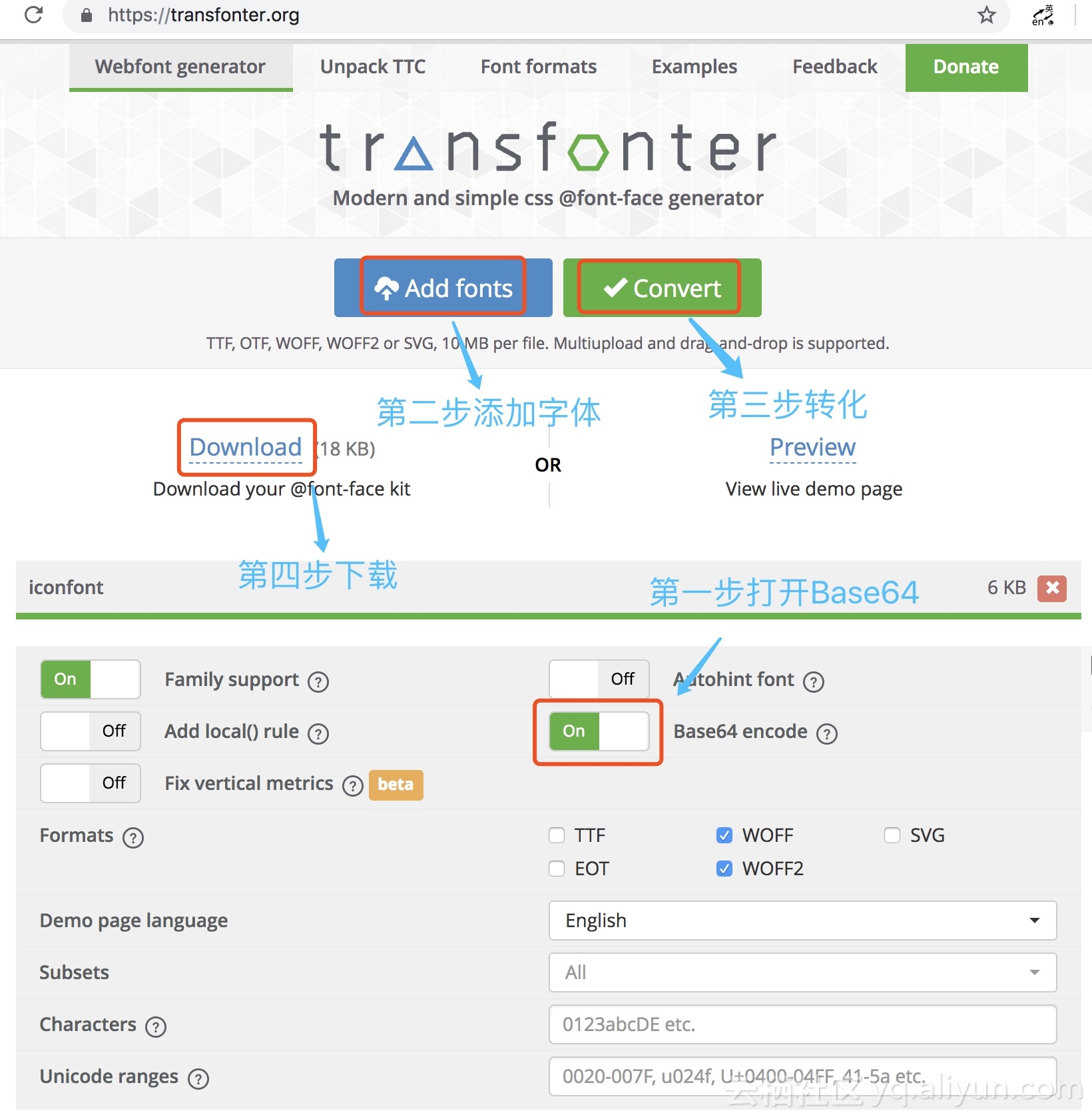 把转换后css文件中的 @font-face 部分替换掉,放入.wxss文件只需要引用iconfont.wxss就可以了
7.页面栈
wx.navigateTo最多5层,超出不入栈,无法打开页面,只能使用redirectTo代替或者传参,小程序不提供返回按钮监听,灵活运用Android实测初始化a页面入栈(a-navigateTo-b)b页面出栈(b-redirectTo-c)c页面出栈(c-redirectTo-d)d页面入栈(d-navigateTo-e)e页面e页面返回d页面d页面返回a页面
8.网络请求
wx.request({ url: app.medinApi.domain + app.medinApi.register, header: { "Content-Type": "application/x-www-form-urlencoded" }, method: 'POST', data : { 'phone': e.detail.value.phone, 'code': e.detail.value.validate, 'openid': app.globalData.openid }, success : function(res) { if (res.data.status == 1) { wx.showToast({ title: '登录成功', icon: 'success', duration: 2000 }) var jumper = setTimeout(function(){ wx.navigateTo({ url: '/pages/index/index' }); },2000); } else { console.log(res); wx.showToast({ title: res.data.msg, icon: 'none', duration: 2000 }) } }, fail: function(res) { console.log(res); }});9.z-index层级失效问题,必须两个组件都设置position属性,才会生效
10.解决首页先onLoad再onLaunch的问题
正常顺序onLaunch执行完了再onLoad,然而并不是,由于是网络请求,可能会在 onLoad 之后才返回。根据实际应用场景需要先onLaunch获得参数,用回调函数来解决app.js
onLaunch: function(){ var me = this; wx.request({ success: function(){ //回调函数,优先执行onLaunch me.globalData.employId = '1'; if (me.employIdCallback){ me.employIdCallback('1'); } } }) }index.js
var app = getApp(); onLoad: function(){ if (app.globalData.employId && app.globalData.employId != '') { wx.redirectTo({ url: '/pages/register/index' }) }else{ if (employId != '') { wx.redirectTo({ url: '/pages/register/index' }) } } }app[onLaunch] -> index[onLoad] -> app[onLaunch]
web-view标签白屏bug
除了wx:if还可以动态控制标签class达到显示隐藏的效果,可以使用三元表达式
class="child {{tab.body == '7' ? 'show' : 'hide'}}"声明:本站所有文章资源内容,如无特殊说明或标注,均为采集网络资源。如若本站内容侵犯了原著者的合法权益,可联系本站删除。








