
关于小程序获取多个formId的实现方法
在此之前,很多人使用过form和button的多层嵌套来实现点击一次获取多个formId的目的,如下图所示,点击一次“提交”,可以获取到多个formId
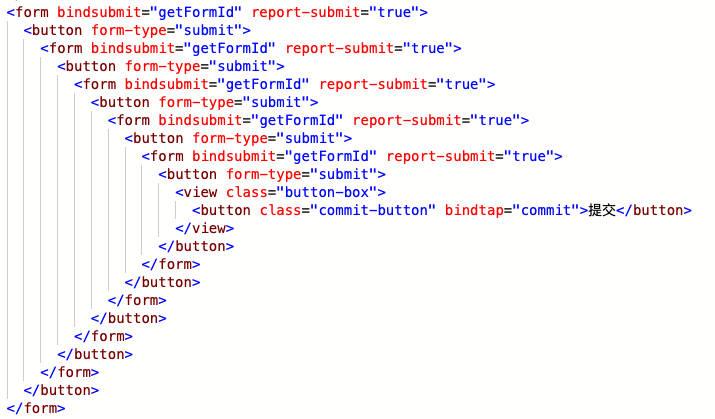
但是在今年3月份,这个投机取巧的方法(算是微信的一个bug)已经被微信修复,那么再使用这个方法,所拿到的formId都是相同的了,也就不符合我们的需求了
接下来给大家介绍另一种方法:
将form和button封装成组件模拟form submit,并把这个组件做成layout级,这样可以把整个页面包括在layout里面,利用事件自动冒泡的特性,只要点击了页面任一位置,就能获取到formId
1. 新建一个组件layout,wxml、wxss、js、json代码分别如下
<form bindsubmit="formSubmit" report-submit class="layout"> <button formType="submit" class="button" hover-class="none"> <view class="fixed"><slot></slot></view> </button></form>.layout { display: inline-block; padding-left: 0; padding-right: 0; box-sizing: border-box; font-size: inherit; text-align: left; text-decoration: none; line-height: inherit; -webkit-tap-highlight-color: transparent; color: inherit; width: 100%; position: relative;}.layout .button{ display: inline-block; padding-left: 0; padding-right: 0; box-sizing: border-box; font-size: inherit; text-align: left; text-decoration: none; line-height: inherit; -webkit-tap-highlight-color: #000; color: inherit; width: 100%; position: relative;}.layout .button .fixed{ position:relative; z-index: 9999; width: 100%;}.layout .button:before,.layout .button:after{ border-width: 0;}Component({ methods: { formSubmit: function (e) { let formId = e.detail.formId console.log(formId) } }}){ "component": true}
2. 在app.json中,将layout添加为全局组件
"usingComponents": { "layout": "/components/layout/index" }
3. 在页面中使用
<layout> <view class="container"> ... </view></layout>微信小程序
声明:本站所有文章资源内容,如无特殊说明或标注,均为采集网络资源。如若本站内容侵犯了原著者的合法权益,可联系本站删除。








