
微信小程序图片裁剪
插件下载网站https://github.com/dlhandsome/we-cropper
在wxml页面添加
<!--start 用户自动截取正方形照片 --><template name="we-cropper"> <canvas class="cropper {{cutImage}}" disable-scroll="true" bindtouchstart="touchStart" bindtouchmove="touchMove" bindtouchend="touchEnd" style="width:{{width}}px;height:{{height}}px;" canvas-id="{{id}}"> </canvas></template><view class="cropper-wrapper {{cutImage}}"> <template is="we-cropper" data="{{...cropperOpt}}"/> <view class="cropper-buttons "> <view class="upload boxshaw cropperUpload" bindtap="chooseimage">重新选择</view> <view class="boxshaw getCropperImage" bindtap="getCropperImage">确定</view> </view></view>
<!--end 用户自动截取正方形照片 -->
对应的js里添加
import WeCropper from '../../utils/we-cropper/we-cropper.js'const device = wx.getSystemInfoSync()const width = device.windowWidthconst height = device.windowHeight - 100;
Page({
data: {
cropperOpt: {
id: 'cropper', width, height, scale: 2.5, zoom: 8, cut: { x: (width - 300) / 2, y: (height - 300) / 2, width: 300, height: 300 } }
},
onLoad: function () { this.getdata(); const { cropperOpt } = this.data new WeCropper(cropperOpt) .on('ready', (ctx) => { console.log(`wecropper is ready for work!`) }) .on('beforeImageLoad', (ctx) => { console.log(`before picture loaded, i can do something`) console.log(`current canvas context:`, ctx) wx.showToast({ title: '上传中', icon: 'loading', duration: 20000 }) }) .on('imageLoad', (ctx) => { console.log(`picture loaded`) console.log(`current canvas context:`, ctx) wx.hideToast() }) .on('beforeDraw', (ctx, instance) => { console.log(`before canvas draw,i can do something`) console.log(`current canvas context:`, ctx) }) .updateCanvas(); }, touchStart(e) { this.wecropper.touchStart(e) }, touchMove(e) { this.wecropper.touchMove(e) }, touchEnd(e) { this.wecropper.touchEnd(e)
},
chooseimage: function () {
var that = this;
wx.chooseImage({ sizeType: ['original', 'compressed'], sourceType: [type], success: function (res) { that.setData({ cutImage: 'show', addtribeConShow: 'hide' }); that.wecropper.pushOrign(res.tempFilePaths[0]); }
})
},
getCropperImage() { var that = this; that.wecropper.getCropperImage((src) => {
if (src) {
//此处添加用户确定裁剪后执行的操作 src是截取到的图片路径
}
}
}
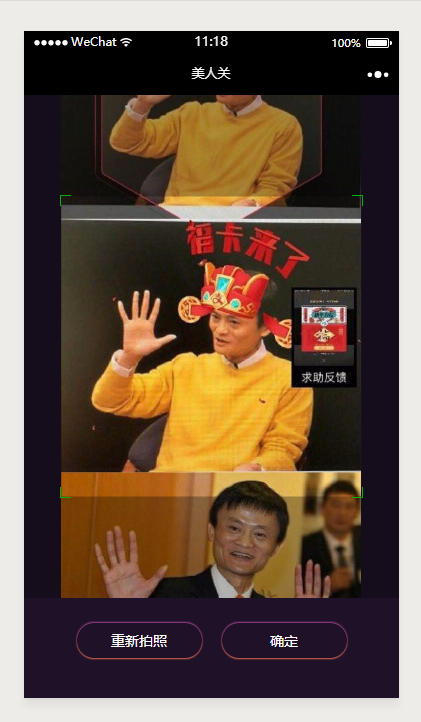
效果如下图:
声明:本站所有文章资源内容,如无特殊说明或标注,均为采集网络资源。如若本站内容侵犯了原著者的合法权益,可联系本站删除。








