写论坛不难,重点是各页面之间的信息传递!
先放成品图,虽然有点单调。。。。但是麻雀虽小五脏俱全!

论坛功能:
1. 发帖(带图片)
2. 浏览各帖
3. 评论
4. 搜素帖子
5. 作者删自己的贴
以上是论坛必备的功能,缺哪个都不完整哦~
贴心代码详解(一)会讲发帖部分
发帖页面
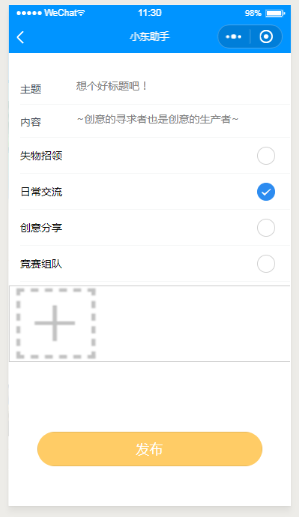
页面看起来还是很简单的,因为服务器大小不够,所以我们设置每个人只能发一张图。
在这个页面里java后台负责图片上传,前端给后台图片filePath就OK了。
这里使用了iview weapp组件
js代码
var app
= getApp()Page({ data
: { img_arr
: [], title
: '', detail
:'', fruit
: [{ id
: 1, name
: '失物招领', }, { id
: 2, name
: '日常交流' }, { id
: 3, name
: '创意分享' }, { id
: 4, name
: '竞赛组队', }], current
: "日常交流" }, handleFruitChange({ detail
= {} }) { this.setData({ current
: detail
.value
});}, formSubmit
: function (e
) { this.upload(e
) }, upload
: function (e
) { if(that
.data
.img_arr
[0]==null){ wx
.request({ header
: { 'content-type': 'application/x-www-form-urlencoded' }, url
: app
.globalData
.url
+'post', data
:{ 'content': e
.detail
.value
.content
, 'title': e
.detail
.value
.title
, 'category': that
.data
.current
, "oppidA":OD }, method
: 'POST', success
: function (res
) { if (res
) { wx
.showToast({ title
: '已提交至管理员审核,请耐心等待!', duration
: 3000 }); setTimeout(() => { wx
.switchTab({ url
: '../../pages/list/list', }) }, 1000); }} } )}else{ setTimeout(() => { for (var i
= 0; i
< (this.data
.img_arr
.length
); i
++) { console
.log(that
.data
.img_arr
[0]) wx
.uploadFile({ url
: app
.globalData
.url
+'post', filePath
: that
.data
.img_arr
[0], name
: 'file', header
: { 'content-type': 'application/x-www-form-urlencoded' }, formData
: { 'content': e
.detail
.value
.content
, 'title': e
.detail
.value
.title
, 'category': that
.data
.current
, "oppidA":OD } , success
: function (res
) { if (res
) { wx
.showToast({ title
: '已提交至管理员审核,请耐心等待!', duration
: 3000 }); setTimeout(() => { wx
.switchTab({ url
: '../../pages/list/list', }) }, 1000); } } }) that
.setData({ formdata
: '' }) }, 1000);}}})}}) }, upimg
: function () { var that
= this; if (this.data
.img_arr
.length
< 1) { wx
.chooseImage({ count
:1, sizeType
: ['original', 'compressed'], success
: function (res
) { that
.setData({ img_arr
: that
.data
.img_arr
.concat(res
.tempFilePaths
) }) } }) } }, onLoad
: function() { },});json内容部分:
{ "usingComponents": { "i-input": "../../dist/input/index" , "i-button": "../../dist/button/index", "i-card": "../../dist/card/index", "i-toast": "../../dist/toast/index", "i-radio-group": "../../dist/radio-group/index", "i-radio": "../../dist/radio/index" }}wxml
<text ></text><form bindsubmit="formSubmit" id='1' bindreset="formReset"> <i-input name="title" type="textarea" title="主题" autofocus placeholder="想个好标题吧!" /> <i-input name="content" type="textarea" title="内容" placeholder="~创意的寻求者也是创意的生产者~" /> <i-panel title="group-水果"> <i-radio-group current="{{current}}" bindchange="handleFruitChange"> <i-radio wx:for="{{fruit}}" position="{{position}}" wx:key="{{item.id}}" value="{{item.name}}"> </i-radio> </i-radio-group></i-panel> <view class="big-logos"> <view class='big-logos_img'> <image bindtap="upimg" src='http://www.ar1es.cn/cimg.png' name="files"></image> </view> <block wx:for="{{img_arr}}" wx:key="{{index}}"> <view class='logoinfo'> <image src='{{item}}'></image> </view> </block> </view> <text ></text> <text ></text> <button class='btn' formType="submit">发布
</button> </form> css
page{ width:750rpx
; height:100%
; TAG标签:
微信小程序微信小程序论坛http://www.xiaochengxub.com/read-107233.html









