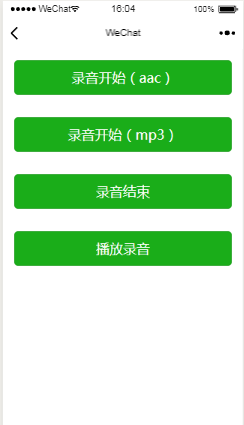
demo.wxml<view> <button bindtap='startRecordMp3' type='primary'>录音开始(mp3)</button></view><view> <button bindtap='stopRecord' type='primary'>录音结束</button></view><view> <button bindtap='playRecord' type='primary'>播放录音</button></view><view> <button bindtap='sendRecord' type='primary'>播放录音</button></view>
demo.wxssview{ padding: 15px;}
demo.js// pages/newMusic/index.jsconst recorderManager = wx.getRecorderManager();Page({ data: { }, /** * 提示 */ tip: function (msg) { wx.showModal({ title: '提示', content: msg, showCancel: false }) } /** * 录制mp3音频 */ , startRecordMp3: function () { recorderManager.start({ format: 'mp3' }); } /** * 停止录音 */ , stopRecord: function () { recorderManager.stop() } /** * 播放录音 */ , playRecord: function () { var that = this; var src = this.data.src; if (src == '') { this.tip("请先录音!") return; } this.innerAudioContext.src = this.data.src; this.innerAudioContext.play() }, onLoad: function (options) { var that = this; recorderManager.onError(function () { that.tip("录音失败!") }); recorderManager.onStop(function (res) { that.setData({ src: res.tempFilePath }) console.log(res.tempFilePath) that.tip("录音完成!") }); this.innerAudioContext = wx.createInnerAudioContext(); this.innerAudioContext.onError((res) => { that.tip("播放录音失败!") }) }})
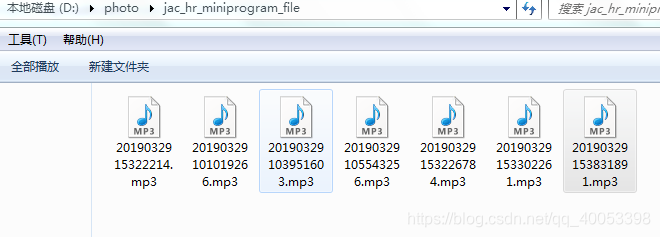
java后台接收package com.azor.controller;import java.text.SimpleDateFormat;import java.util.Date;import java.util.HashMap;import java.util.Map;import javax.servlet.http.HttpServletRequest;import org.apache.commons.codec.binary.Base64;import org.apache.commons.lang.StringUtils;import org.slf4j.LoggerFactory;import org.springframework.beans.factory.annotation.Autowired;import org.springframework.core.env.Environment;import org.springframework.web.bind.annotation.RequestMapping;import org.springframework.web.multipart.MultipartFile;import org.springframework.web.multipart.MultipartHttpServletRequest;import com.azor.utils.HttpAPIService;import ch.qos.logback.classic.Logger;import net.sf.json.JSONObject;@RestController@RequestMapping("/base_voice")public class BaseController {private static final Logger logger = (Logger) LoggerFactory.getLogger(BaseController.class);private static String lineSeparator = System.getProperty("line.separator");@Autowiredprotected Environment env;@Autowiredprotected HttpAPIService httpAPIService;/** 上传文件保存路径 */private final String FILE_SAVE_PATH = "D:/photo/jac_hr_miniprogram_file/";/** 主业务数据Map */protected Map<String, Object> dataMap = new HashMap<>();/** HTTP POST 请求Map */protected Map<String, Object> postMap = new HashMap<>();@RequestMapping("/file_upload")public void saveFile(HttpServletRequest request, String url) throws Exception {logger.info("文件上传开始" + lineSeparator);// 1.获取从前台传过来得图片MultipartHttpServletRequest req = (MultipartHttpServletRequest) request;MultipartFile multipartFile = req.getFile("file");// 2.获得文件扩展名String extOfFile = getExtOfFile(multipartFile);// 3.保存到本地BufferedOutputStream bos = null;String filename = null;try {File dir = new File(file_save_path);if (!dir.exists()) {// 判断文件目录是否存在dir.mkdirs();}filename = new SimpleDateFormat("yyyyMMddHHmmss").format(new Date()) + (int) (Math.random() * 1000) + "."+ extOfFile;bos = new BufferedOutputStream(new FileOutputStream(file_save_path + filename));bos.write(multipartFile.getBytes());} catch (Exception e) {e.printStackTrace();} finally {if (bos != null) {try {bos.close();} catch (IOException e) {e.printStackTrace();}}}}public String getExtOfFile(MultipartFile multipartFile) {// 获取文件的 名称.扩展名String oldName = multipartFile.getOriginalFilename();String extensionName = "";// 获取原来的扩展名if ((oldName != null) && (oldName.length() > 0)) {int dot = oldName.lastIndexOf('.');if ((dot > -1) && (dot < (oldName.length() - 1))) {extensionName = oldName.substring(dot+1);}}return extensionName;}}
效果
TAG标签:
小程序上传录音
http://www.xiaochengxub.com/read-107320.html









