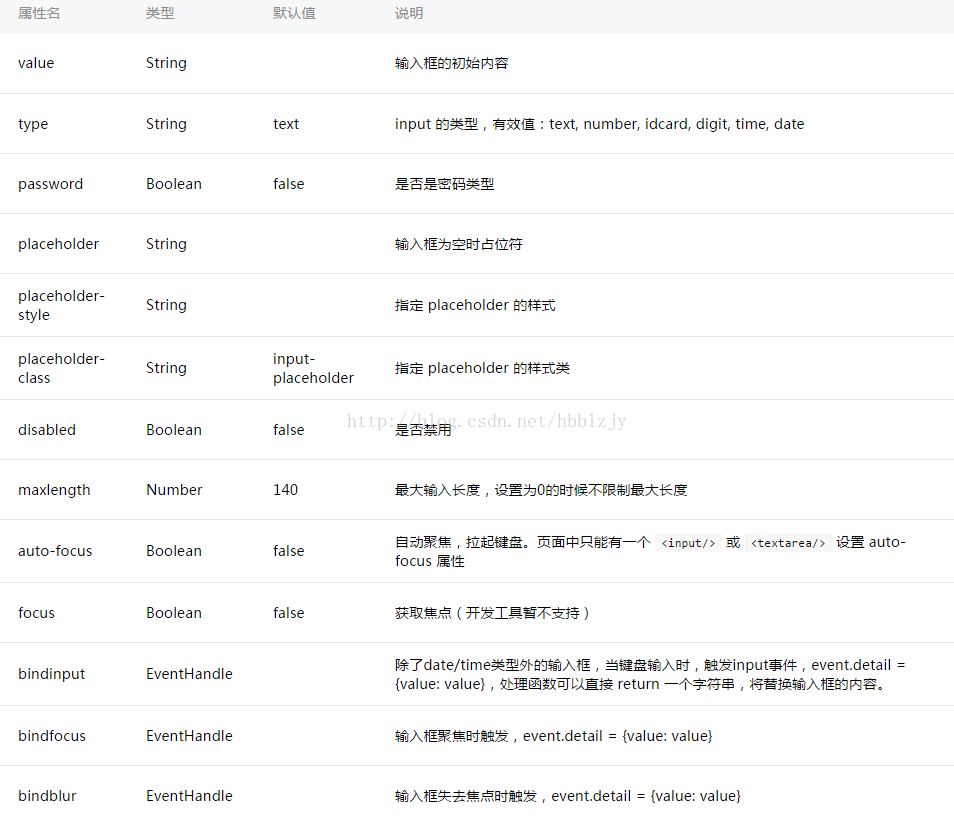
<!--如果在同一个form表单中创建了多个input输入框,可以给给每个输入框,创建自己的name=“userName”属性,可以区别哪个输入框,并通过添加属性提交:bindsubmit=
"方法名" 重置:bindreset=
"方法名",达到清除输入框内容的目的js文件中的用法,e.detail.value.userName.length--><view
class=
"itemView">用户名: <input
class=
"input" name=
"userName" placeholder=
"请输入用户名" bindinput=
"userNameInput"/> </view><view
class=
"itemView">密 码: <input
class=
"input" password placeholder=
"请输入密码" bindinput=
"passWdInput" /> </view><view
class=
"viewName" style=
"background-color:#fbf9fe"> <button
class=
"loginBtn" bindtap=
"loginBtnClick">登录</button> <button
class=
"resetBtn" bindtap=
"resetBtnClick">清除</button></view><view>{{infoMess}}</view><view>{{userName}}</view><view>{{passWd}}</view><view
class=
"viewName" style=
"margin-top: 60px;"> <navigator url=
"Component/TextInput/TextInput"> <text
class=
"view-Name">各类型输入框展示</text> </navigator></view>
var app = getApp()Page({ data: { infoMess:
'', userName:
'', userN:
'', passWd:
'', passW:
'' }, userNameInput:function(e){
this.setData({ userN:e.detail.value }) }, passWdInput:function(e){
this.setData({ passW:e.detail.value }) }, loginBtnClick:function(){
if(
this.data.userN.length ==
0 ||
this.data.passW.length ==
0){
this.setData({ infoMess:
'温馨提示:用户名和密码不能为空!', }) }
else{
this.setData({ infoMess:
'', userName:
'用户名:'+
this.data.userN, passWd:
'密码:'+
this.data.passW }) } }, resetBtnClick:function(e){
this.setData({ infoMess:
'', userName:
'', userN:
'', passWd:
'', passW:
'', }) }, onLoad: function () { console.log(
'onLoad')
var that =
this app.getUserInfo(function(userInfo){ that.setData({ userInfo:userInfo }) }) }})然后在第二个界面中显示了不同的样式和功能的input<!--pages/index/Component/TextInput/TextInput.wxml--><view
class=
"viewTitle"> <text
class=
"view-Name">TextInput输入框展示</text> <view
class=
"lineView"></view></view><view
class=
"section"> <input
class=
"input" placeholder-style=
"font-size:15px" placeholder=
"自动聚焦弹出键盘,一个页面中只能有一个" auto-focus/></view><view
class=
"section"> <input
class=
"input" placeholder=
"此处只有在点击下方按钮时才聚焦" focus=
"{{focus}}" /></view><view
class=
"section1"> <button bindtap=
"bindButtonTap">使得输入框获取焦点</button></view><view
class=
"section"> <input
class=
"input" maxlength=
"10" placeholder=
"最大输入长度10" /></view><view
class=
"section__title">你输入的是:{{inputValue}}</view><view
class=
"section"> <input
class=
"input" bindinput=
"bindKeyInput" placeholder=
"输入同步到view中"/></view><view
class=
"section"> <input
class=
"input" bindinput=
"bindReplaceInput" placeholder=
"连续的两个1会变成2" /></view><view
class=
"section"> <input
class=
"input" bindinput=
"bindHideKeyboard" placeholder=
"输入123自动收起键盘" /></view><view
class=
"section"> <input
class=
"input" type=
"number" placeholder=
"这是一个数字输入框" /></view><view
class=
"section"> <input
class=
"input" password
type=
"text" placeholder=
"这是一个密码输入框" /></view><view
class=
"section"> <input
class=
"input" type=
"digit" placeholder=
"带小数点的数字键盘"/></view><view
class=
"section"> <input
class=
"input" type=
"idcard" placeholder=
"身份证输入键盘" /></view><view
class=
"section"> <input
class=
"input" placeholder-style=
"color:red" placeholder=
"占位符字体是红色的" /></view>Page({ data: { focus:
false, inputValue:
'' }, bindButtonTap: function() {
this.setData({ focus:
true }) }, bindKeyInput: function(e) {
this.setData({ inputValue: e.detail.value }) }, bindReplaceInput: function(e) {
var value = e.detail.value
var pos = e.detail.cursor
if(pos != -
1){
var left = e.detail.value.slice(
0,pos) pos = left.replace(/
11/g,
'2').length }
return { value: value.replace(/
11/g,
'2'), cursor: pos } }, bindHideKeyboard: function(e) {
if (e.detail.value ===
"123") { wx.hideKeyboard() } }, onLoad:function(options){ }, onReady:function(){ }, onShow:function(){ }, onHide:function(){ }, onUnload:function(){ }})
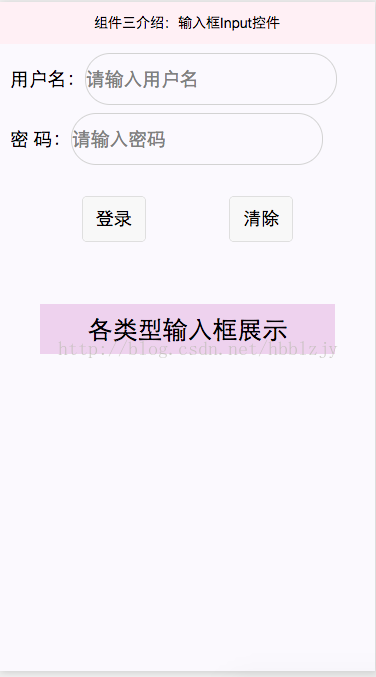
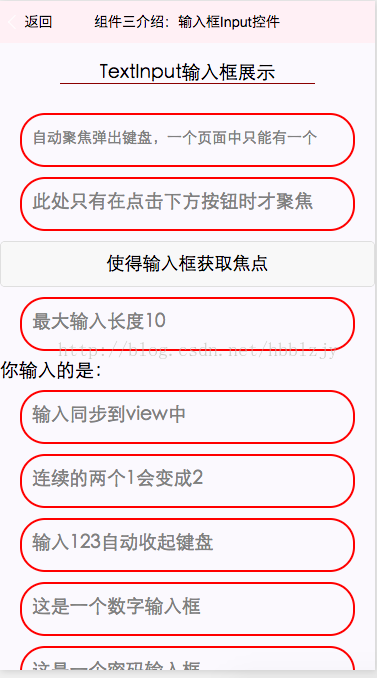
效果图
TAG标签:
微信小程序小程序input
http://www.xiaochengxub.com/read-107430.html









