
微信分享接口,微信小程序实现分享到朋友圈
微信小程序实现分享到朋友圈微信小程序分享到朋友圈,微信官方没有提供开放接口,所以我们通过canva画布,生成一张图片,图片自带小程序码,用户通过识别二维码,达到分享小程序到朋友圈目的。效果图: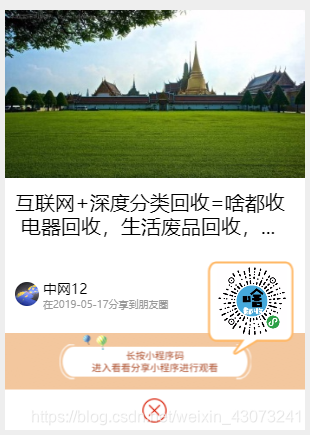 下面我们来实现以上图片:WXML:viewclass='share'canvascanvas-id="shareCanvas"style="width:300px;height:380px"/canvasviewclass='bottom'imagesrc="/image/user/close1.png"bindtap='closeShare'/image/view/viewWXSS:/pages/user/ShareCircleOfFriends.wxss/page{background:#eee;}.share{width:300px;height:380px;position:fixed;left:0;right:0;top:0;bottom:100rpx;margin:auto;}.btn-box{padding:1060rpx60rpx060rpx;}button{background:darkturquoise;}.bottom{width:300px;height:40px;background-color:white;}.bottomimage{width:70rpx;height:70rpx;margin-left:45%;margin-top:2%;}JS:data:{sharebg:'https://shadoushoutest.zwyxit.com/Images/ShareImage/share3.png',//分享底部背景图shareTitle:'互联网+深度分类回收=啥都收电器回收,生活废品回收,工厂废料企业转行酒楼设备企业设备,库存货物等等,有偿服务和无偿服务',//分享标题shareCoverImg:'https://shadoushoutest.zwyxit.com/Images/ShareImage/share1.png',//分享封面图shareQrImg:'https://shadoushoutest.zwyxit.com/Images/ShareImage/share2.png',//分享小程序二维码userInfo:{headImg:'http://shadoushou.zwyxit.com/Images/User/0515100040529.jpg',//用户头像nickName:'打豆豆',//昵称},seeDate:'2018-12-04',//看视频日期}/生命周期函数--监听页面加载/onLoad:function(options){letthat=this;varUserName=app.globalData.login_sj[0];wx.setNavigationBarTitle({title:'分享到朋友圈',})vartime=util.formatTime(newDate());varUserImage=app.globalData.login_sj[2];vartimestamp=Date.parse(newDate());vardate=newDate(timestamp);//获取年份varY=date.getFullYear();//获取月份varM=(date.getMonth()+110?'0'+(date.getMonth()+1):date.getMonth()+1);//获取当日日期varD=date.getDate()10?'0'+date.getDate():date.getDate();vartime1=Y+"-"+M+"-"+Dthat.data.userInfo.nickName=UserName;that.data.userInfo.headImg=UserImage;that.setData({nickName:that.data.userInfo,headImg:that.data.userInfo,seeDate:time1})console.log(that.data.userInfo.nickName);//创建画布constctx=wx.createCanvasContext('shareCanvas')//白色背景ctx.setFillStyle('#fff')ctx.fillRect(0,0,300,380)ctx.draw()//下载底部背景图wx.getImageInfo({src:that.data.sharebg,success:(res1)={ctx.drawImage(res1.path,0,250,300,130)//下载视频封面图wx.getImageInfo({src:that.data.shareCoverImg,success:(res2)={ctx.drawImage(res2.path,0,0,300,168)//分享标题//ctx.setTextAlign('center')//文字居中ctx.setFillStyle('#000')//文字颜色:黑色ctx.setFontSize(20)//文字字号:20pxif(that.data.shareTitle.length=14){//不用换行ctx.fillText(that.data.shareTitle,10,200,280)}elseif(that.data.shareTitle.length=28){//两行letfirstLine=that.data.shareTitle.substring(0,14);letsecondLine=that.data.shareTitle.substring(14,27);ctx.fillText(firstLine,10,200,280)ctx.fillText(secondLine,10,224,280)}else{//超过两行letfirstLine=that.data.shareTitle.substring(0,14);letsecondLine=that.data.shareTitle.substring(14,27)+'...';ctx.fillText(firstLine,10,200,280)ctx.fillText(secondLine,10,224,280)}//下载二维码wx.getImageInfo({src:that.data.shareQrImg,success:(res3)={letqrImgSize=70ctx.drawImage(res3.path,212,256,qrImgSize,qrImgSize)ctx.stroke()ctx.draw(true)//用户昵称ctx.setFillStyle('#000')//文字颜色:黑色ctx.setFontSize(14)//文字字号:16pxctx.fillText(that.data.userInfo.nickName,38,284)//观看日期ctx.setFillStyle('#999')//文字颜色:黑色ctx.setFontSize(10)//文字字号:16pxctx.fillText('在'+that.data.seeDate+'分享到朋友圈',38,298)//下载用户头像wx.getImageInfo({src:that.data.userInfo.headImg,success:(res4)={//先画圆形,制作圆形头像(圆心x,圆心y,半径r)ctx.arc(22,284,12,0,Math.PI2,false)ctx.clip()//绘制头像图片letheadImgSize=24ctx.drawImage(res4.path,10,272,headImgSize,headImgSize)//ctx.stroke()//圆形边框ctx.draw(true)//保存到相册wx.canvasToTempFilePath({canvasId:'shareCanvas',success:function(res){wx.saveImageToPhotosAlbum({filePath:res.tempFilePath,success:function(res){wx.showToast({title:'分享图片已保存到相册,请到朋友圈选择图片发布'})}})}},this)}})}})}})}})}
声明:本站所有文章资源内容,如无特殊说明或标注,均为采集网络资源。如若本站内容侵犯了原著者的合法权益,可联系本站删除。








