
微信小程序video组件小视频
视频播放组件与图片加载组件也没啥差别,使用起来也没啥注意的
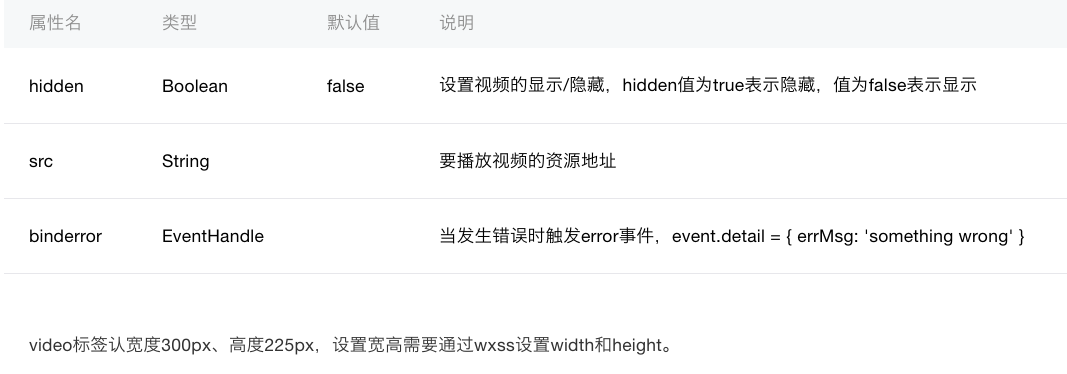
重要属性:
.wxml页面
<!--pages/video/video.wxml--><view class="section tc"> <video src="{{src}}" controls ></video> <view class="btn-area"> <button bindtap="bindButtonTap">获取视频</button> </view></view><view class="section tc"> <video id="myVideo" src="http://wxsnsdy.tc.qq.com/105/20210/snsdyvideodownload?filekey=30280201010421301f0201690402534804102ca905ce620b1241b726bc41dcff44e00204012882540400&bizid=1023&hy=SH&fileparam=302c020101042530230204136ffd93020457e3c4ff02024ef202031e8d7f02030f42400204045a320a0201000400" danmu-list="{{danmuList}}" enable-danmu danmu-btn controls></video>
//视频播放地址变化即可 <view class="btn-area"> <button bindtap="bindButtonTap">获取视频</button> <input bindblur="bindInputBlur"/> <button bindtap="bindSendDanmu">发送弹幕</button> </view></view>
.js页面
// pages/video/video.jsfunction getRandomColor () { let rgb = [] for (let i = 0 ; i < 3; ++i){ let color = Math.floor(Math.random() * 256).toString(16) color = color.length == 1 ? '0' + color : color rgb.push(color) } return '#' + rgb.join('')}Page({ onReady: function (res) { this.videoContext = wx.createVideoContext('myVideo') }, inputValue: '', data: { src: '', danmuList: [ { text: '第 1s 出现的弹幕', color: '#ff0000', time: 1 }, { text: '第 3s 出现的弹幕', color: '#ff00ff', time: 3 }] }, bindInputBlur: function(e) { this.inputValue = e.detail.value }, bindButtonTap: function() { var that = this wx.chooseVideo({ sourceType: ['album', 'camera'], maxDuration: 60, camera: ['front','back'], success: function(res) { that.setData({ src: res.tempFilePath }) } }) }, bindSendDanmu: function () { this.videoContext.sendDanmu({ text: this.inputValue, color: getRandomColor() }) }})
一个简短的视频建立。声明:本站所有文章资源内容,如无特殊说明或标注,均为采集网络资源。如若本站内容侵犯了原著者的合法权益,可联系本站删除。








